Ghost Mannequin for T-Shirts: Before & After Examples
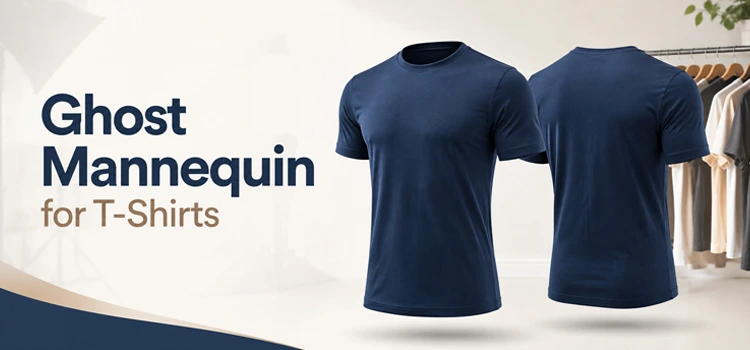
Ghost Mannequin for T-Shirts
“Ghost mannequin removes the mannequin or model from a t-shirt photo and creates a hollow, 3D effect. This makes the shirt look naturally worn without showing any support. It improves product appeal and drives more sales for clothing brands.”
Ghost mannequin service helps t-shirt sellers show their products in the best way. It creates a clean, professional look that attracts buyers. Shoppers trust what they can clearly see. This technique gives every t-shirt a store-quality appearance without a costly photo shoot.
What Is Ghost Mannequin Service for T-Shirts?
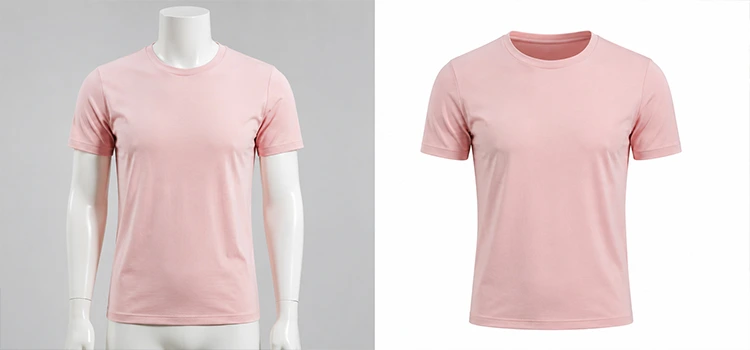
“Mannequin removal service is a photo editing technique that makes a t-shirt appear worn by an invisible figure. It combines front and back shots into one natural-looking image. This method saves money and gives t-shirts a consistent, high-end catalog look.”
This service uses advanced photo editing to merge multiple images. First, you shoot the t-shirt on a mannequin. Then the editor removes the mannequin using clipping path techniques. The final image shows the shirt in full shape, with no model, no stand, and no distraction. Many e-commerce brands use this for every product in their catalog.
Why Do T-Shirt Brands Need Ghost Mannequin Photos?
“T-shirt brands need ghost mannequin photos because flat-lay shots fail to show fit, shape, or structure. A ghost mannequin image shows the shirt exactly as a customer would wear it. It builds trust and reduces product return rates.”
Customers cannot touch your product online. They rely on photos. A well-shaped t-shirt image tells them how the collar sits, how the sleeves fall, and how the body fits. Ghost mannequin photos communicate all of this clearly. Brands that use this method see better engagement and higher conversion rates.
What Do Before and After Ghost Mannequin Examples Look Like?
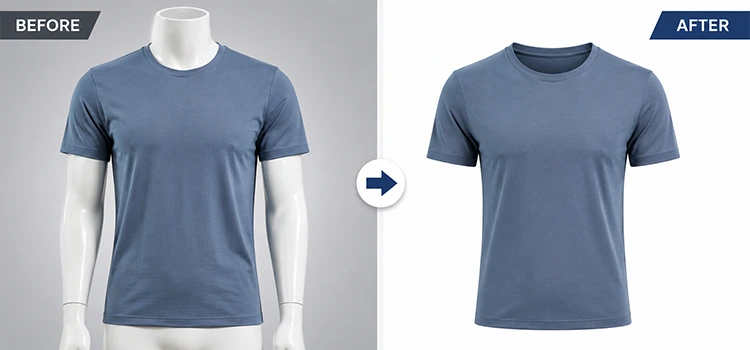
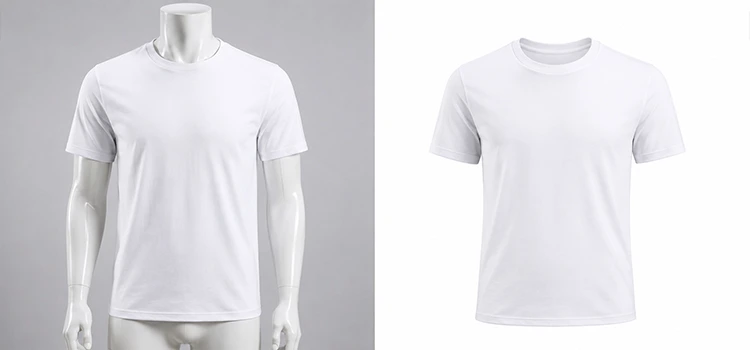
“Before ghost mannequin editing, a t-shirt looks stiff and mannequin-dependent. After editing, the mannequin disappears and the shirt holds its natural 3D form. The result is a clean, hollow-body image that looks professional and ready for any product listing.”
Before the Edit:
- The t-shirt sits on a visible plastic or fabric mannequin
- The background is often unclean or inconsistent
- The neck, armholes, and hem show the mannequin body
After the Edit:
- The mannequin is fully removed using clipping path selection
- The inside of the collar, sleeves, and hem are visible naturally
- Background removal gives a white or transparent final output
- The shirt looks like someone invisible is wearing it
This transformation takes a raw studio shot and turns it into a retail-ready product image. The difference is striking and immediate.
How Does the Clipping Path Technique Work in Ghost Mannequin Editing?
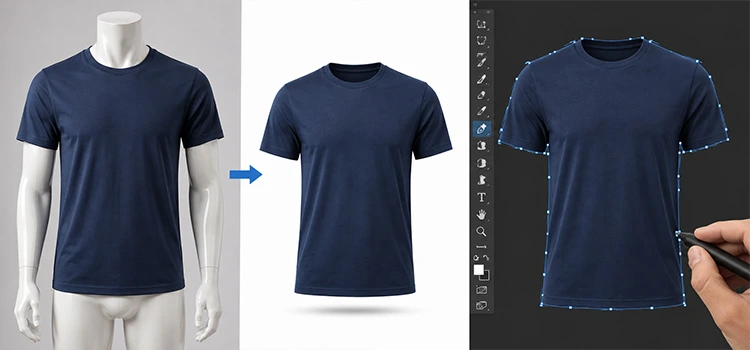
“The clipping path technique traces the exact edge of a t-shirt in a photo. This selection separates the shirt from the mannequin and the background. Editors then combine multiple shots to rebuild the full shape of the garment with no visible support.”
Editors use pen tools in software like Adobe Photoshop. They draw a precise path around the outer edge of the t-shirt. This creates a clean selection. Then they remove the mannequin layer. For the inside of the collar and armholes, they use a second shot — usually the inner label or back panel — to fill in the missing areas. The result is a seamless, complete garment image.
What Types of T-Shirts Benefit Most from This Service?
“All t-shirt styles benefit from ghost mannequin editing, but structured designs — like polo necks, v-necks, and fitted cuts — show the most improvement. These styles have more shape to preserve, and ghost mannequin editing captures every detail accurately.”
Here are the t-shirt types that see the biggest improvement:
- Crew neck t-shirts — the collar shape stays intact
- V-neck t-shirts — the neckline angle shows clearly
- Polo shirts — collar structure looks natural and crisp
- Fitted t-shirts — body taper and sleeve fit display accurately
- Oversized t-shirts — drape and silhouette communicate better
Flat-lay shots lose shape. Hangers distort fit. Ghost mannequin keeps the structure right.
How Does Background Removal Improve T-Shirt Product Images?
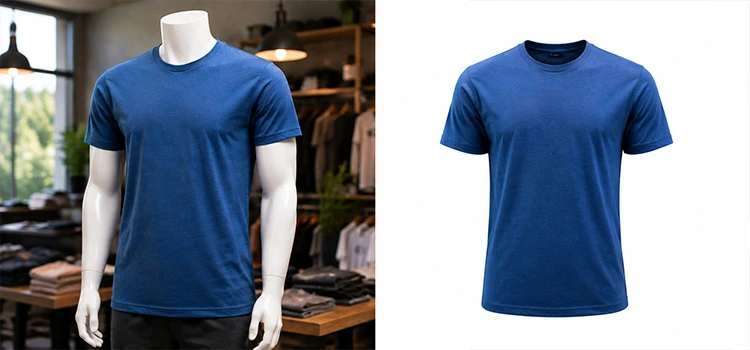
“Background removal cleans the area around the t-shirt and replaces it with white or transparent space. This removes all distractions from the product. It creates a consistent look across your full catalog and meets the image standards of most major e-commerce platforms.”
A cluttered background pulls attention away from the product. Background removal puts the t-shirt at the center of attention. Most platforms like Amazon, ASOS, and Shopify require white backgrounds. This step also makes it easy to place t-shirt images on any web page or marketing material. Combined with ghost mannequin editing, background removal creates a fully polished, professional product photo.
How Long Does Ghost Mannequin Editing Take?
“Ghost mannequin editing for a single t-shirt image usually takes 15 to 30 minutes per photo when done manually. Professional services with experienced editors can process bulk orders and return clean images within 12 to 24 hours depending on volume and complexity.”
Turnaround time depends on:
- Number of images in the order
- Complexity of the t-shirt design (seams, prints, zippers)
- Number of shots required per garment (front, back, inside label)
- The service provider’s workflow and team size
Many editing studios offer 24-hour turnaround for small batches. Large orders may take 48 to 72 hours. Always confirm timelines before placing a bulk order.
Is Ghost Mannequin Service Worth the Cost for Small T-Shirt Brands?
“Yes, removing mannequin is worth the cost even for small brands. Professional product images increase buyer confidence, reduce returns, and improve search rankings. The investment in quality photo editing directly supports higher sales and a stronger brand image.”
Small brands often skip professional editing to save money. This is a mistake. Poor product images cost more in lost sales than editing fees. Ghost mannequin services are scalable. You can start with 10 to 20 images and grow from there. Many services offer affordable per-image pricing for startups and independent sellers.
What Should You Look for in a Ghost Mannequin Service Provider?
“Look for a ghost mannequin service provider with a strong portfolio, fast turnaround, clear pricing, and experience with apparel photo editing. Check before and after examples of their work. Make sure they understand garment structure and clipping path accuracy before you commit.”
Key qualities to evaluate:
- Portfolio quality– look at real before and after samples
- Clipping path precision– edges must be clean with no fringing
- Color accuracy– the t-shirt color must not shift after editing
- Communication– they should understand your brand style guide
- Revision policy– make sure corrections are included in the price
- Pricing structure– per image vs. bulk pricing options
A reliable service treats each image with care and delivers consistent results across your full catalog.
FAQs: Ghost Mannequin for T-Shirts
-
What is the ghost mannequin effect in fashion photography?
The ghost mannequin effect is a photo editing technique used in fashion photography. It removes the mannequin from product photos to create the illusion that an invisible figure is wearing the garment. This gives t-shirts a 3D, life-like appearance. It helps customers better understand the fit, structure, and shape of the clothing before they buy.
-
Can I use ghost mannequin service for all types of t-shirts?
Yes, you can use removal of mannequin service for all t-shirt types including crew neck, v-neck, polo, oversized, and fitted styles. The technique works well for any garment that has a defined shape. Structured designs benefit the most, but even basic tees look more professional with ghost mannequin photo editing applied.
-
How many photos do I need per t-shirt for ghost mannequin editing?
You typically need two to three photos per t-shirt for ghost mannequin editing. These include a front view, a back view, and sometimes an inside shot of the collar or label area. The editor combines these shots to create one complete, seamless image that shows the full garment shape without the mannequin.
-
What file format do I receive after ghost mannequin editing?
Most ghost mannequin providers deliver final images in JPEG or PNG format. PNG files include a transparent background, which gives you more flexibility in placement. JPEG files with white backgrounds work best for most e-commerce platforms. You can request both formats from your editing provider depending on your publishing needs.
-
Does ghost mannequin editing change the color of my t-shirt?
No, professional ghost mannequin editing does not change the color of your t-shirt. Experienced editors preserve the original color throughout the clipping path and background removal process. If any color correction is required due to poor lighting in the original shoot, good providers will flag this and offer correction as a separate service.
-
How is ghost mannequin editing different from flat-lay photography?
Ghost mannequin editing shows a t-shirt in a 3D, worn shape. Flat-lay photography shows the shirt lying flat on a surface. Flat-lay images lose body shape, sleeve structure, and fit information. Ghost mannequin images communicate all of these details clearly. For most e-commerce listings, ghost mannequin images outperform flat-lay shots in engagement and conversion.
-
Can background removal be done at the same time as ghost mannequin editing?
Yes, most photo editing studios handle background removal and ghost mannequin editing together in one service package. This saves time and ensures consistency across both processes. The clipping path selection made during ghost mannequin editing is also used for background removal, so combining both services is efficient and cost-effective for t-shirt sellers.
-
How much does ghost mannequin service cost per image?
Ghost mannequin photo editing typically costs between $1 and $5 per image depending on complexity and the service provider. Simple t-shirts with clean edges cost less. Complex garments with multiple components or detailed seams cost more. Bulk orders often get discounted rates. Many professional photo editing studios offer custom pricing for brands with high-volume editing needs.
-
Is it possible to do ghost mannequin editing in-house?
Yes, you can do ghost mannequin editing in-house if you have skilled photo editors and access to Adobe Photoshop. However, it requires strong knowledge of clipping path techniques, layer masking, and image compositing. For most small t-shirt brands, outsourcing to a professional service saves time, reduces errors, and produces better results than in-house editing.
-
Which e-commerce platforms require ghost mannequin or white background images?
Amazon, ASOS, eBay, Zalando, and most major fashion e-commerce platforms require white background product images. Ghost mannequin editing paired with background removal meets these requirements perfectly. It also improves your product’s visual consistency across your store. Brands that follow platform image standards typically rank higher in search results and see stronger click-through rates on product listings.