Clipping Path for E-commerce Product Photography
For commercial product images, visual quality is critical. However, capturing a good photo is only the first step. After a product photoshoot, images must go through a proper editing process to achieve a polished, market-ready look. Here needs clipping path for e-commerce product photography.
The key steps in this process is selecting the product accurately before editing. For products with hard edges, this selection is best done using a clipping path. In Adobe Photoshop, the Pen Tool is used to create accurate paths that isolate the product from the background.
This makes clipping path an essential technique for products with sharp, well-defined edges. In short, great product photography alone is not enough, the editing process must be equally strong. For hard edge products, using a clipping path ensures clean, professional results that are ready for commercial use.
1. What is a Clipping Path in E-commerce?
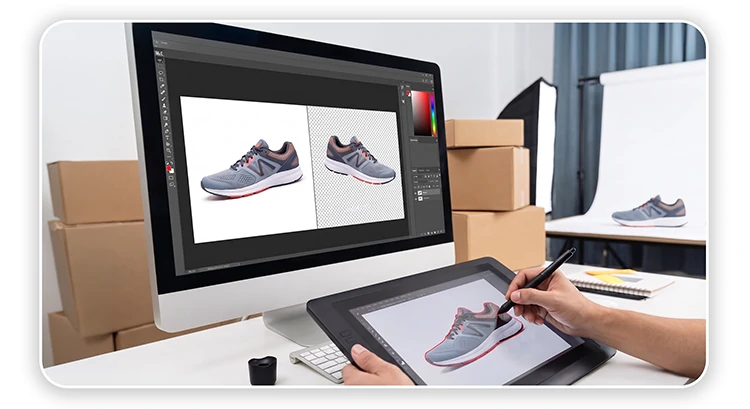
Clipping path is a modern image selection technique used in photo editing. It works like a closed vector shape and is created using the Pen Tool in Adobe Photoshop. This process is done completely manually, not automatically, which ensures a high level of accuracy and control.
You may also read: What Is Clipping Path? A Complete Guide & Its Applications
Clipping paths are primarily used to remove backgrounds or isolate a product from its surroundings. In cases where a single image contains multiple elements, clipping paths allow editors to select each element individually and apply adjustments such as color correction or other modifications.
This technique is most effective for hard edge products, such as bottles, plates, computers, or a mouse, where clean and sharp edges are required. For soft edge subjects like hair or fur, other methods such as image masking or color range are typically used instead.
The main advantage of clipping paths is that they are editable. When saved in PSD format, the paths can be modified at any time. Many clients outsource clipping path work and later have their in-house designers make further adjustments based on their needs.
Clipping path is a highly important and widely used professional photo editing service for enhancing eCommerce product image quality. In the examples below, you can see how multiple objects within a single image are individually selected using clipping paths for quality editing control.
2. How does Clipping Paths Drive E-commerce Conversions?
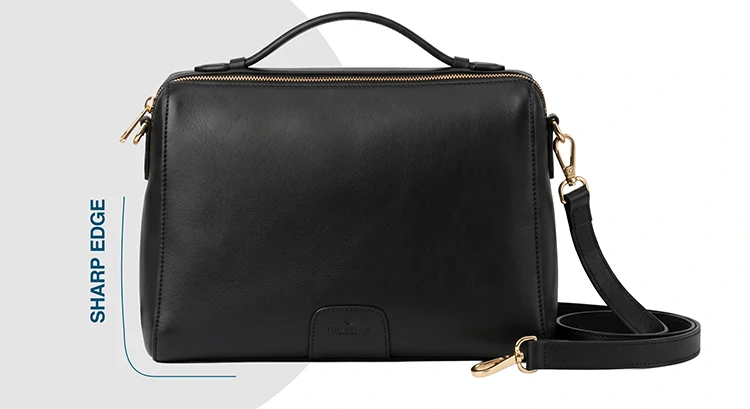
Clipping paths improve eCommerce conversions by enhancing visual clarity, consistency, and trust. They create clean, distraction-free images, ensure marketplace compliance, and boost click-through rates. Flawless edges and flexible editing enable better product presentation, stronger branding, and more effective marketing assets.
Clipping path directly impacts conversions by improving visual clarity, trust, and consistency, three things that influence buying decisions.
- Clean, Distraction-Free Product Focus
Clipping path removes messy backgrounds and isolates the product. This helps customers focus only on what matters. Less distraction is equal to faster decision-making.
- Sharp Edges Build Trust
Jagged edges or halos make products look fake. Hand-drawn clipping paths create crisp, natural edges. That level of accuracy signals quality and quality builds trust.
- Marketplace Compliance (Amazon, Shopify)
Platforms often require pure white or clean backgrounds. Clipping paths ensure images meet these standards, preventing listing rejection and improving visibility.
- Consistent Catalog Appearance
When every image has the same clean cutout, your store looks professional. Consistency increases perceived brand value and keeps users engaged longer.
- Higher Click-Through Rate (CTR)
Clean, high contrast product images stand out in search results and ads. Better visuals lead to more clicks.
- Enables Advanced Editing (Color Variants, Ads)
Clipping paths allow easy background changes, shadow creation, and color variations. This flexibility helps you create more marketing assets from one image.
3. What are the categories of Clipping Path?
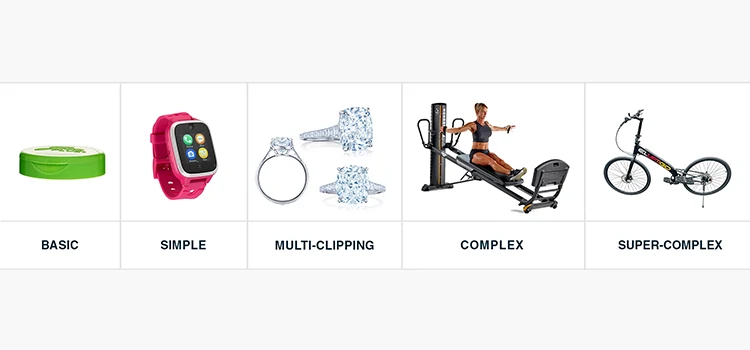
Clipping paths are categorized by complexity, from basic to super complex, based on anchor points and object details. Simpler paths handle smooth edges, while advanced ones manage intricate shapes and holes. Multiple clipping paths enable separate editing of different elements within a single image.
As professional editors, we classify projects into five technical categories based on anchor point density and geometric complexity.
Basic Clipping Path
A basic clipping path is used for objects with straight edges or simple, consistent curves that do not contain any holes or complex details. Common examples include books, smartphones, and rectangular boxes. These images typically require only 5-10 anchor points, allowing editors to create clean and accurate selections quickly. This type is widely used in high volume eCommerce workflows where speed and cost efficiency are essential.
Simple Clipping Path
A simple clipping path is applied to objects that have slightly more curves and detail but still follow a single continuous outline. Products such as bottles, loafers, and hats fall into this category. These require around 10-20 anchor points, with careful control of Bézier curves to maintain smooth edges. While still relatively quick to complete, this level demands more exactness to avoid edge distortion or background remnants.
Medium Clipping Path
A medium clipping path is used for objects that include multiple holes or internal gaps, requiring compound paths. Examples include handbags with handles or shoes with laces, where certain areas must be cut out while preserving the main object. This process involves accurately “knocking out” the background through these gaps, which adds complexity. It requires a higher level of skill and attention to detail compared to basic or simple paths.
Complex Clipping Path
A complex clipping path is necessary for objects with intricate edges, multiple curves, and detailed internal structures. Common examples include bicycles, chain-like jewelry, or apparel with ruffles and folds. These images often require 50-100+ anchor points to accurately follow every edge and maintain natural-looking results. The process is time-intensive and demands strong technical expertise to ensure smooth and realistic selections.
Super Complex Clipping Path
Super complex clipping paths represent the highest level of difficulty in manual image selection. These are used for highly detailed objects such as fine mesh jewelry, wire baskets, or heavy machinery with numerous internal holes and irregular edges. Creating these paths can require hundreds of anchor points and hours of appropriate manual work. Even advanced AI tools cannot reliably replicate this level of detail, making human expertise essential for achieving professional quality results.
Multiple Clipping Path
A multiple clipping path is used when different parts of a single object need to be edited separately. Instead of creating one path, the editor creates multiple paths for individual elements within the image. This is especially useful for products with different materials or colors, such as jackets with buttons, leather sections, or fur collars. It allows accurate adjustments like color correction, brightness changes, or texture enhancement without affecting the entire image. Multi-clipping paths are widely used in eCommerce and virtual photography, where one base image is repurposed to create multiple variations efficiently.
4. What are the steps of Clipping Path process?
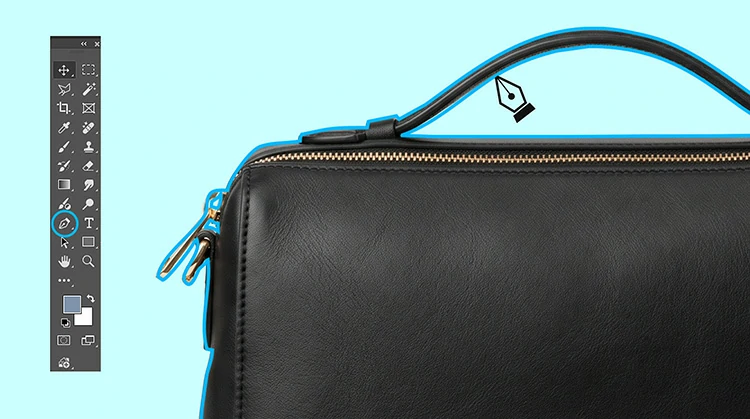
The clipping path process involves opening the image in Photoshop, zooming for accuracy, and using the Pen Tool to create a path with accurate anchor points and smooth curves. After converting the path to a selection, the background is removed, aligned, and saved in required formats.
Open a product image in Photoshop.
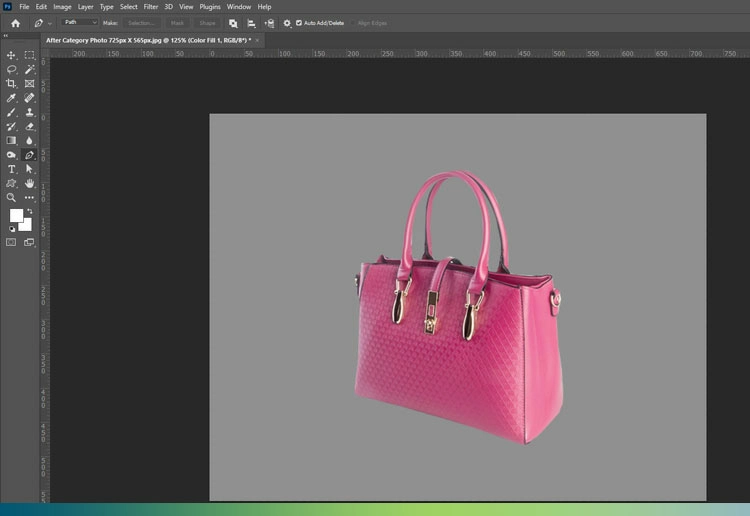
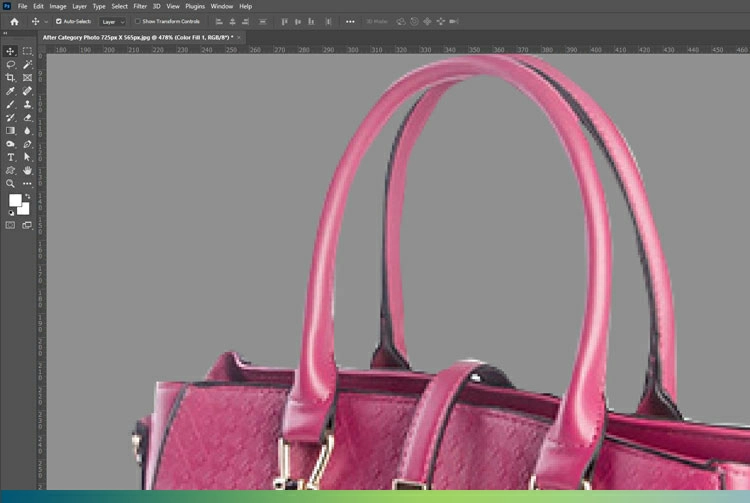
Zoom to 300%-400% to identify the true edge.
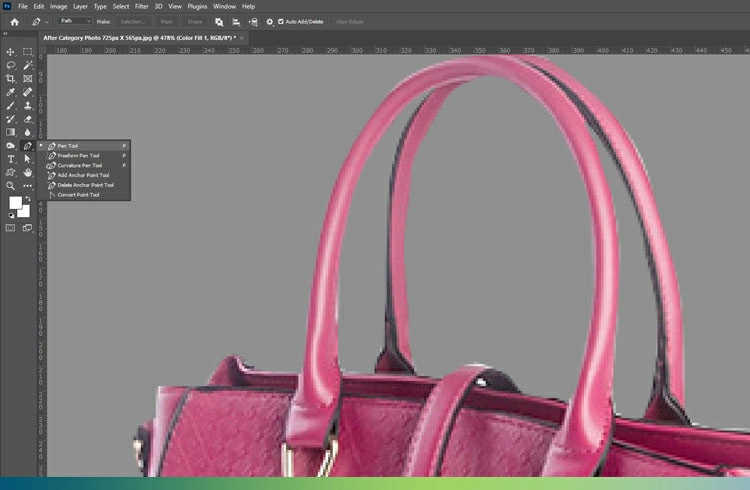
Select Pen Tool and create path
Place anchor points 1 pixel inside the product edge to select and eliminate background.
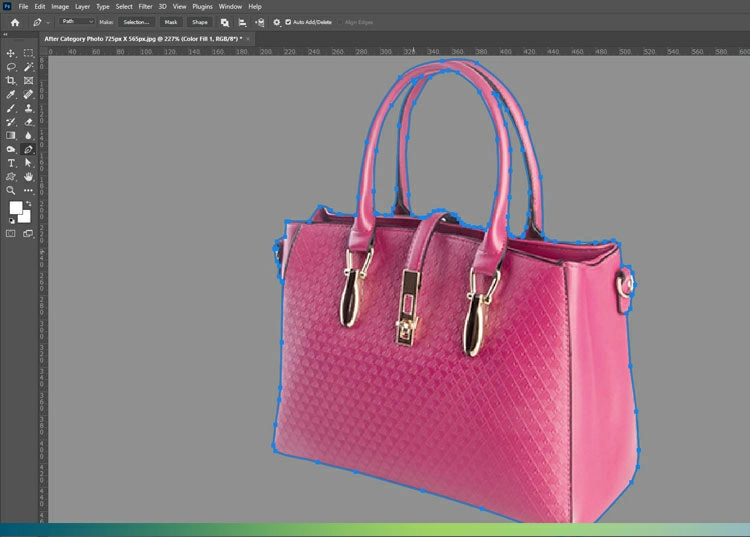
Drag Bézier handles to match curves. Use minimal points to ensure smooth lines.
After coming to the starting point, finish the path creation and press Enter to transform the path in selection.
Press Ctrl or Cmd + Shift + I to invert the selection from the specific object to the background. Finally press the Delete button and thus remove the background.
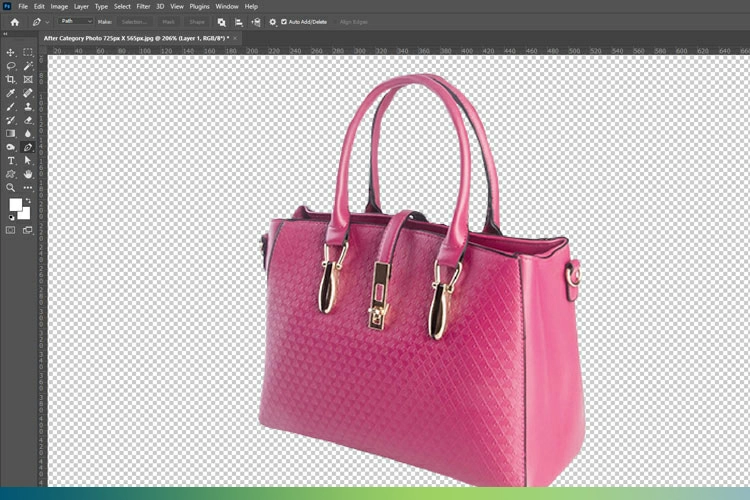
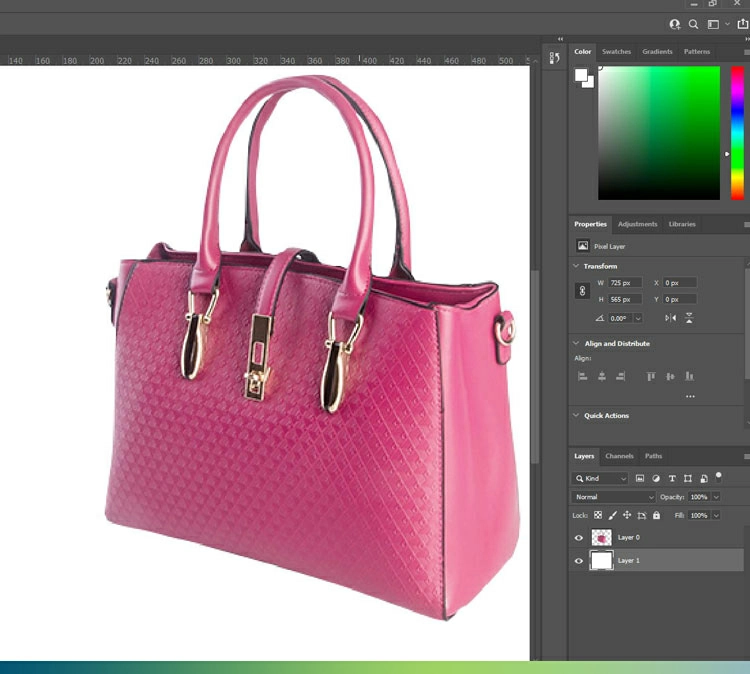
Add a new layer and white color as a background.
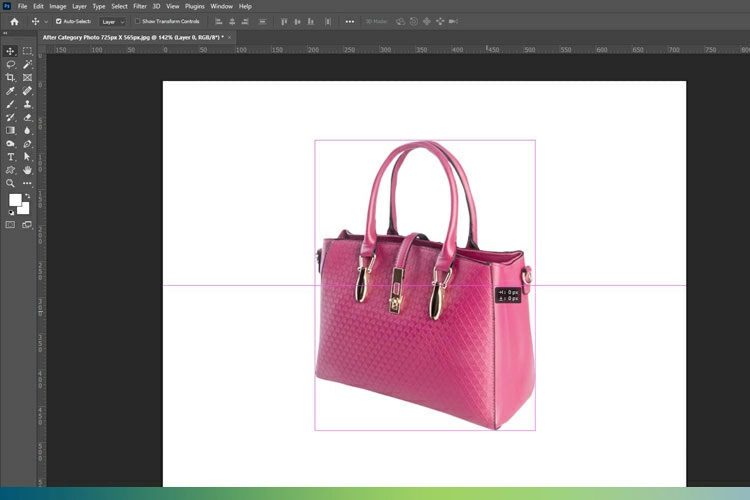
Maintain right alignment as per the ecommerce guideline.
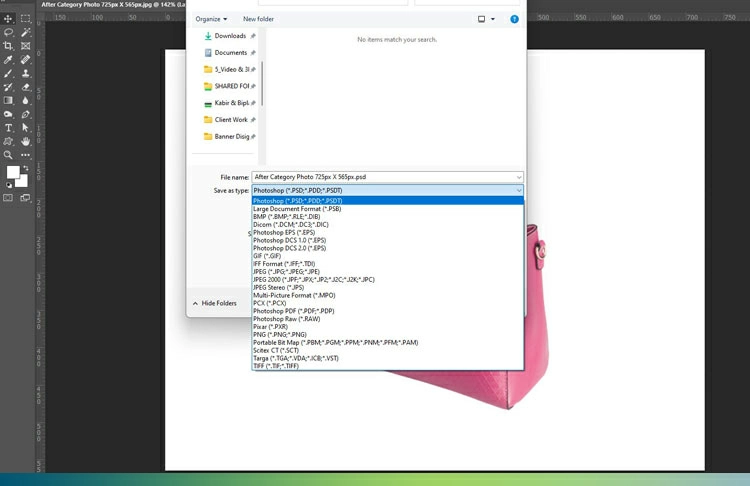
Now save the image as expected Formats like JPG, PNG, WebP, PSD, etc.
5. What are the Common Technical Errors in E-commerce Photo Editing?
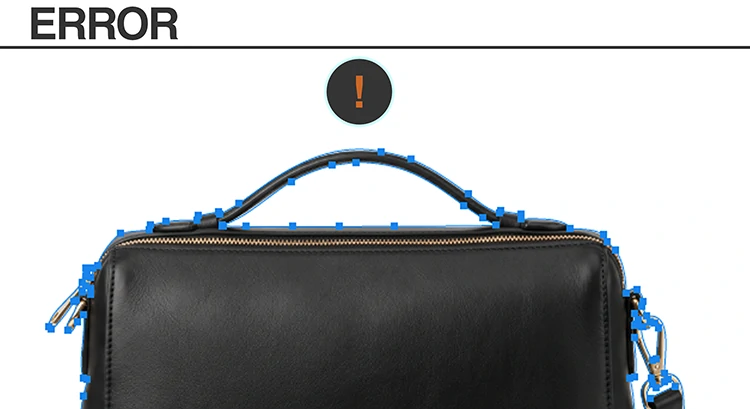
Common clipping path errors include anchor point overload, edge halos, disconnected paths, and over-reliance on AI. These issues cause jagged edges, background remnants, and loss of detail. Using minimal points, proper path placement, compound paths, and hybrid editing ensures clean, professional results.
Common technical errors in clipping path during eCommerce product photo editing can significantly reduce image quality and professionalism. The most frequent issues is anchor point overload, where too many points create uneven, bumpy edges that look unnatural. Another common mistake is edge halos, caused by not placing the path slightly inside the object, leaving traces of the original background. Disconnected paths are also a problem, especially when editors fail to properly remove negative spaces like the inside of a mug handle. Additionally, over-reliance on AI-based background removal for complex objects often leads to loss of fine details and distorted textures, making the final image appear unprofessional.
| Error Type | Description | Impact on Image Quality | Solution |
| Anchor Point Overload | Using too many anchor points creates uneven, bumpy edges | Edges look jagged and unprofessional | Use minimal points with smooth Bézier curves |
| Edge Halos | Path is placed exactly on or outside edge, leaving background remnants | Visible white/colored outlines around product | Apply 1-pixel inset rule when drawing the path |
| Disconnected Paths | Negative spaces (like holes or gaps) are not properly clipped | Background remains in unwanted areas | Create compound paths and clip all internal spaces |
| AI Dependency | Over-reliance on automatic background removal tools for complex objects | Loss of detail, distorted edges and textures | Use manual clipping path or hybrid (AI + human refinement) |
6. What are the differences between Clipping Path and Background Removal?
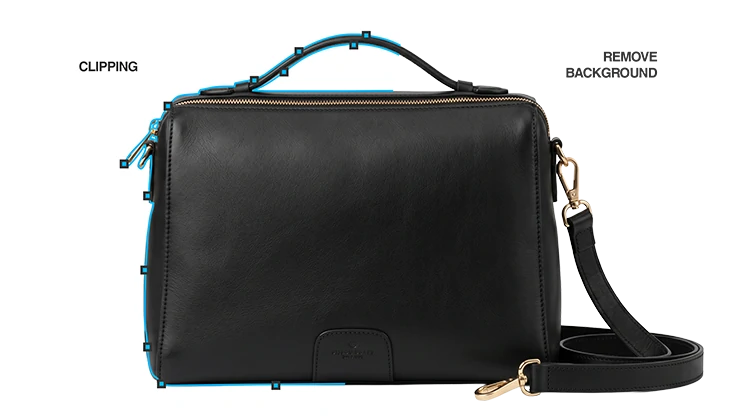
Clipping path is a manual, vector-based technique using the Pen Tool that delivers sharp, scalable, and highly accurate edges. Background removal relies on raster or AI tools, offering faster results but with variable accuracy, softer edges, and potential errors in complex images.
Clipping path and background removal differ significantly in both technique and output quality. The first one is a manual, vector based process created using the Pen Tool, producing mathematically sharp edges with virtually unlimited scalability and consistent, human-verified accuracy. In contrast, background removal typically relies on raster-based tools like Magic Wand or AI algorithms, which work at the pixel level. While faster, these methods can produce softer or blurry edges and their accuracy can vary depending on the image, sometimes introducing errors or inconsistencies, especially in complex subjects.
| Feature | Clipping Path | Background Removal (Raster/AI) |
| Tool | Pen Tool (Manual) | Magic Wand / AI Algorithms |
| Edge Type | Mathematically Sharp | Pixel-based (can be blurry) |
| Scalability | Infinite | Limited by Resolution |
| Accuracy | 100% (Human Verified) | Variable (AI Hallucinations) |
7. AI vs. Human Editing: What Does the 2026 Landscape Look Like?
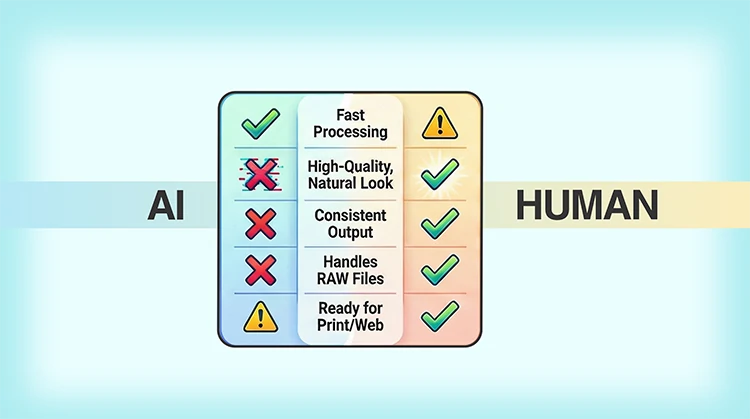
Now, image editing is shifting to a hybrid Human-in-the-Loop model, where AI handles speed and basic tasks while humans ensure perfection and quality. This balance improves efficiency, but manual editing remains essential for complex, high-end, and luxury product images.
In 2026, the industry is clearly shifting toward a hybrid Human-in-the-Loop model that combines the speed of AI with the flawlessness of human expertise. AI is primarily used for initial object detection and quick selection, helping streamline workflows and reduce processing time. However, human editors remain essential for refining paths, especially when dealing with complex edges, fine details, and overall quality control. This balance ensures both efficiency and accuracy. Looking ahead, for luxury and high-ticket products, manual clipping paths will continue to be a commercial requirement, as AI still struggles to accurately interpret material transparency and intricate textures.
| Aspect | AI Editing Role | Human Editing Role | Industry Insight (2026) |
| Primary Function | Initial object detection and quick selection | Manual path refinement and quality assurance | Hybrid (Human-in-the-Loop) model is the industry standard |
| Strengths | Speed, automation, handling high-volume basic tasks | Precision, accuracy, handling complex edges and details | AI improves efficiency but cannot replace human expertise |
| Limitations | Struggles with transparency, fine details, textures | Slower compared to AI | Human input required for high-quality output |
| Best Use Case | Basic and simple clipping paths | Complex and super complex clipping paths | Combination ensures optimal results |
| Future Outlook | Will continue improving with automation capabilities | Will remain essential for premium and luxury editing | Manual paths remain critical for high-end eCommerce images |
8. What Industries do Use Clipping Path Services?
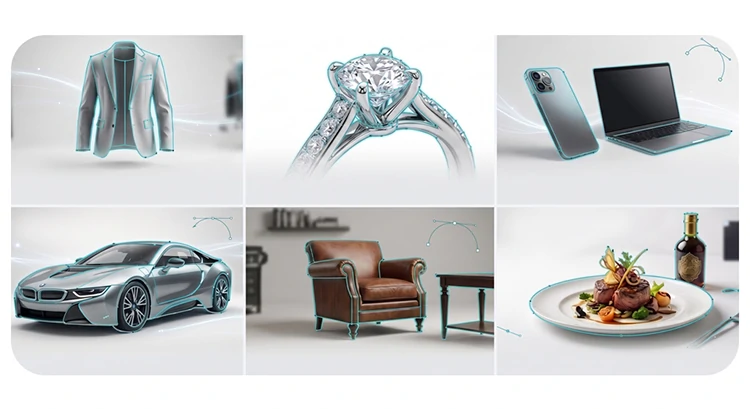
Clipping path is essential across industries like fashion, jewelry, electronics, and eCommerce, each requiring different levels of rightness. From basic to super complex paths, it ensures clean edges, accurate detail separation, and consistent visuals, ultimately enhancing product presentation, brand quality, and conversion rates.
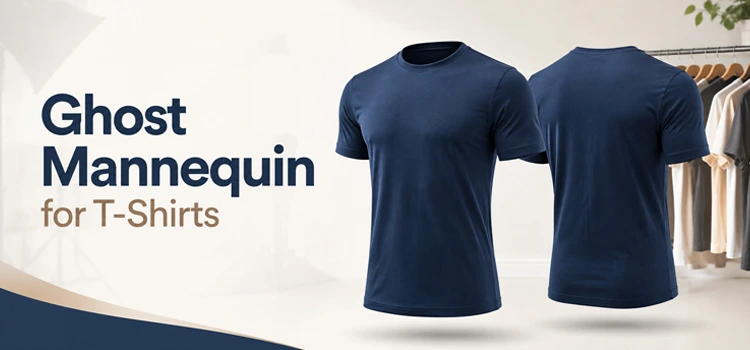
Clipping path plays a critical role across multiple industries, each with its own technical demands. In fashion, it is essential for ghost mannequin editing, where both interior and exterior paths must be carefully created and merged to achieve a seamless, hollow look. In the jewelry industry, super complex clipping paths are required to precisely separate metal surfaces from reflective gemstones, ensuring clarity without losing detail. For electronics, clipping paths demand high vector quality to maintain sharp edges and clean lines, reinforcing the product’s modern, high-tech appearance.
Industries that use Clipping Path Services
| Industry | Use Case Description | Technical Requirement | Purpose / Outcome |
| Fashion | Used for ghost mannequin editing by merging interior and exterior paths | Multiple and compound clipping paths | Creates a clean, hollow product look for apparel |
| Jewelry | Isolates metal parts from reflective gemstones and intricate details | Super complex clipping paths with high correctness | Preserves fine details and enhances luxury appearance |
| Electronics | Ensures sharp, clean edges for modern product presentation | High quality and smooth edge control | Highlights sleek design and professional aesthetics |
| Furniture | Handles large objects with multiple edges, holes, and shadows | Medium to complex clipping paths | Produces clean catalog images for online marketplaces |
| Automotive | Separates body, wheels, and intricate parts for detailed editing | Complex to super complex paths with multiple layers | Enables detailed retouching and realistic reflections |
| Cosmetics | Focuses on small packaging items with glossy surfaces and fine edges | Simple to medium clipping paths | Enhances product appeal and brand consistency |
| Food & Beverage | Isolates packaged items or containers with defined shapes | Basic to simple clipping paths | Creates clean, attractive images for ads and menus |
| Home Decor | Works with decorative items like lamps, frames, and accessories | Medium clipping paths with internal cutouts | Maintains aesthetic consistency across product listings |
| Industrial Tools | Handles complex shapes like machinery parts and tools | Complex clipping paths | Ensures accuracy for catalogs and technical listings |
| E-commerce Retail | Applies across mixed product categories for consistent image presentation | All types depending on product complexity | Improves brand uniformity and conversion rates |
9. What are the Approximately Cost and Quality Benchmarks of Clipping Path Service?
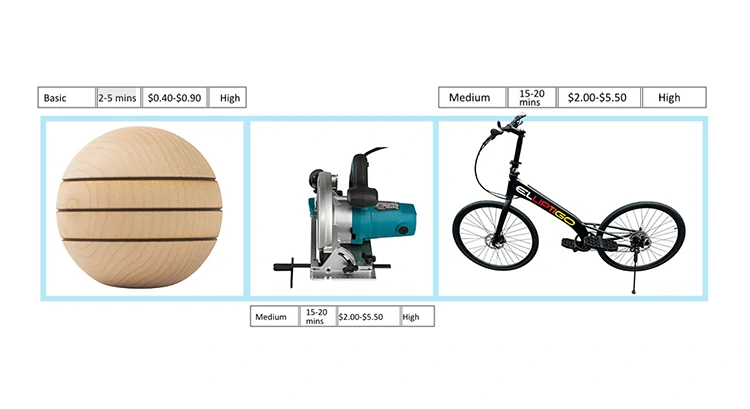
Clipping path costs and quality depend on image complexity. Basic paths are fast and affordable with high accuracy, while medium paths require more time and error free. Super complex paths are time-intensive, costly, and demand expert-level manual work for maximum accuracy beyond AI capabilities.
The cost and quality benchmarks of clipping path services vary significantly depending on the complexity of the image. Basic clipping paths typically take around 2-5 minutes to complete and cost approximately $0.40 to $0.90, offering high accuracy for simple objects. Medium complexity images require more correctness and time, usually 15-20 minutes, with costs ranging from $2.00 to $5.50 while still maintaining high-quality results. In contrast, super complex clipping paths can take over an hour to complete and cost between $15.00 and $35.00, as they demand expert-level manual work to achieve the highest level of accuracy that automated tools cannot replicate.
| Category | Typical Time | Commercial Cost (Est.) | Accuracy Level | Description |
| Basic | 2-5 mins | $0.40-$0.90 | High | Suitable for simple objects with smooth edges; fast and cost-efficient |
| Medium | 15-20 mins | $2.00-$5.50 | High | Requires more appropriateness for moderately complex shapes and multiple curves |
| Super Complex | 60+ mins | $15.00-$35.00 | Expert Only | Highly detailed objects needing manual expertise and extensive anchor points |
What are the Frequently Asked Questions about Clipping Path for E-commerce?
To help you better understand the technical aspects, costs, and benefits of clipping paths services, we have compiled the most common questions from e-commerce sellers and photographers.
-
What exactly is a clipping path?
A clipping path is a closed vector shape or loop created using the Pen Tool in Adobe Photoshop. It is used to isolate a product from its background. Because it is done manually, it provides the highest level of premium feel for products with hard, well-defined edges.
-
Why should I use a clipping path instead of AI background removal?
While AI is fast, it often struggles with hallucinations, distorted textures, or blurry edges. A manual clipping path ensures:
- Mathematical sharpness: Clean, professional lines.
- Scalability: As a vector-based selection, it remains sharp at any size.
- Human Verification: An editor ensures every anchor point is perfectly placed to avoid “edge halos.”
-
Can clipping paths be used for models or furry products?
Clipping paths are best for hard-edge objects (like bottles, electronics, or furniture). For soft-edge subjects like hair, fur, or wool, techniques like Image Masking or Color Range selection are more appropriate to capture fine, semi-transparent details.
-
What are “Multiple Clipping Paths”?
Multiple clipping paths involve creating several individual paths within a single image. Photo editors use to isolate different parts of a product, such as the laces, sole, and leather of a shoe, so they can be edited or color-corrected independently without affecting the rest of the image.
-
How much does a clipping path service cost?
Costs depend on the complexity of the object:
- Basic: $0.40-$0.90 (e.g., a box or book)
- Medium: $2.00-$5.50 (e.g., a handbag with handles)
- Super Complex: $15.00-$35.00 (e.g., fine mesh jewelry or heavy machinery)
-
How do I know if my image is Complex or Super Complex?
- Complex images have many curves and internal holes (like a bicycle).
- Super Complex images feature hundreds of intricate details, such as wire baskets or chain-link jewelry, requiring over an hour of manual work to perfect.
-
What is the 1-pixel inset rule?
To prevent edge halos (where a thin line of the old background is still visible), professional editors place the anchor points 1 pixel inside the product’s true edge. This ensures a clean, seamless transition when you place on a new white background.
-
Are clipping paths editable after the work completion?
Yes. If you save the file in PSD (Photoshop) format, the paths remain as layers. You or your in-house designer can modify the anchor points at any time to adjust the selection.
-
How do clipping paths help with Amazon or Shopify listings?
Most e-commerce platforms require a pure white background. A clipping path allows you to remove the original background and replace it perfectly to meet these strict marketplace compliance standards, preventing your listings from rejection.
-
Will AI replace human editors by 2026?
While AI has become a powerful tool for initial object detection, the 2026 industry standard is a Human-in-the-Loop model. Humans are still essential for quality assurance and handling complex textures, transparency, and luxury items where “pixel-perfect” accuracy is a commercial requirement.
Final Thoughts
In e-commerce, the clipping path is the technical foundation of your visual brand. Perfection in cutouts leads directly to increased click-through rates and decreased returns by accurately representing the product.