Photoshop Nano Banana Explained
If you have spent any time on web platforms, you have probably seen the phrase “Nano Banana” and wondered what it means. It sounds like a fruit-sized joke. But in reality, Photoshop Nano Banana refers to Adobe’s newest AI-powered micro-tools inside Photoshop. These features are built to take tiny, detailed edits and make them instant, accurate, and unbelievably easy even for non-designers.
It is something like that Nano Banana as Photoshop’s way of saying: “We have shrunk the hardest part of editing into something anyone can do.”
Here, we will break down what Photoshop Nano Banana actually is, how it works, and the things you can do with it.
What Is Photoshop Nano Banana?
“Photoshop Nano Banana” is not a literal tool you click in the menu. It is a playful community nickname for Photoshop’s ultra-small, AI-driven editing abilities. These usually involve:
- Micro-selections
- Pinpoint object removal
- Small-scale generative edits
- AI-based enhancements inside tight or complex areas
These updates come from Adobe Firefly’s deep-learning model, which now powers many Photoshop features like Generative Fill, Remove Tool, Object Selection, and Generative Expand. Nano Banana refers specifically to the extreme precision level Adobe’s AI can operate on.
Imagine selecting a tiny banana in a giant fruit bowl and replacing it with something else instantly, and without touching the Pen Tool. That level of microscopic control is what inspired the name.
Why Designers Love It
Photoshop requires skill and patience. With Nano Banana style AI accuracy:
- Tiny details can be edited flawlessly
- Time-consuming tasks are done in seconds
- Beginners can make expert-level adjustments
- Complex masking becomes a one-click process
For top-level photographers, e-commerce teams, digital marketers, designers, and editors, this higher efficiency is a game changer.
What You Can Do Using Photoshop Nano Banana AI
Here are some powerful and fun things you can achieve with these micro-precision AI tools:
-
Edit tiny objects without manual masking
You can isolate extremely small elements like jewelry, reflections, folds, dust, mini props without zooming in 500%.
Photoshop AI instantly understands:
- Edges
- Texture
- Depth
- Lighting
Meaning it selects only what you intended, and nothing else.
Use cases:
Product photos, fashion retouching, cosmetics, Amazon listings, jewelry photography.
-
Remove micro imperfections automatically
Dust spots on product photos, tiny scratches, loose threads, Eyelash flaws, Sensor dirt, etc.
Nano AI can clean all this instantly. This used to take 20-30 minutes per image using clone and healing tools. Now its seconds.
-
Replace small objects with AI prompts
You can highlight a small object and tell Photoshop what to replace it with:
- Replace a small piece of fruit
- Change a logo on a shirt
- Swap a micro-prop in a flat lay
- Change buttons, textures, or accessories
- Replace a reflection detail
The AI keeps the lighting and shadows consistent with the scene.
-
Perfect hair strands and soft edges
Soft edges were always Photoshop’s hardest challenge. Nano Banana AI makes them simple.
You can refine:
- Flyaway hairs
- Fur
- Transparent fabrics
- Glass and water edges
You get clean edges without the plastic, cutout look.
-
Add or remove small shadows and highlights
Lighting correction used to be a professional-level skill. Now, AI does intelligent micro-lighting:
- Adds natural shadows
- Removes harsh reflections
- Fixes overexposed areas
- Smooths subtle gradients
This is especially useful for e-commerce product photos.
-
Fix tiny text or logo details
For designers working with packaging, apparel mockups, or corporate images, Nano Banana AI can:
- Sharpen tiny printed text
- Refine edges on labels
- Remove wrinkles around logos
- Create clean, crisp surfaces
It improves legibility without degrading image quality.
-
Create mini generative assets
The same tech behind Generative Fill can create ultra-small design elements:
- Decorative icons
- Small background textures
- Micro patterns
- Additional tiny props
You can build entire compositions by editing only the small details.
-
Scale up tiny edits without losing quality
Perhaps the coolest part:
You can expand, stretch, or enhance tiny edited areas and Photoshop intelligently reconstructs missing pixels using generative AI.
This means:
- Upscaling old photos
- Restoring tiny cropped sections
- Enlarging details without losing clarity
-
Photoshop now guesses the missing details
Photoshop, Nano Banana can guess the missing details more closely than ever because Adobe’s latest Firefly-powered AI models are analyzing the images at a very small level. Whereas before it might have been a case of simply cloning a broad texture or guessing a simple pattern, Nano Banana actually breaks the image down into very small visual units – edges, shadows, gradients, reflections, and material properties. It looks at how these very small details change over the whole photo and then it creates the missing parts with context-aware logic that has the same lighting, geometry, and color structure as the original.
What you get as a result is intelligence to fill the missing parts, more perfect and cleaner edges, and reconstructions which are as if they were inherently part of the image and not created later.
-
Edit images with natural language prompts.
Photoshop and Nano Banana enable you to edit pictures. It will be close to human language. It makes very complicated edits almost as simple as a few clicks. The drawing masks or clicking through different menu options shift to simple telling of your requirements to Photoshop. For instance, “remove the shadow under the product”, “add more texture to the fabric”, or “replace the small object with a gold ring”, etc. Behind, AI is doing the micro-precision work.”
Nano Banana is able to do the most detailed, AI-powered, single-layered editing in Photoshop. It can understand minute details, soft edges, lighting, and even the context. You write the edit in a simple manner, the AI deciphers it, and Photoshop produces an untouched, clean, and realistic result that is coherent with the original scene.
-
Remove or add objects/people.
Nano Banana AI is now well-known in the creative industry. It has come up with to refer to the software’s newly ultra-precise AI tools that can remove or add objects and even people with minimal manual work.
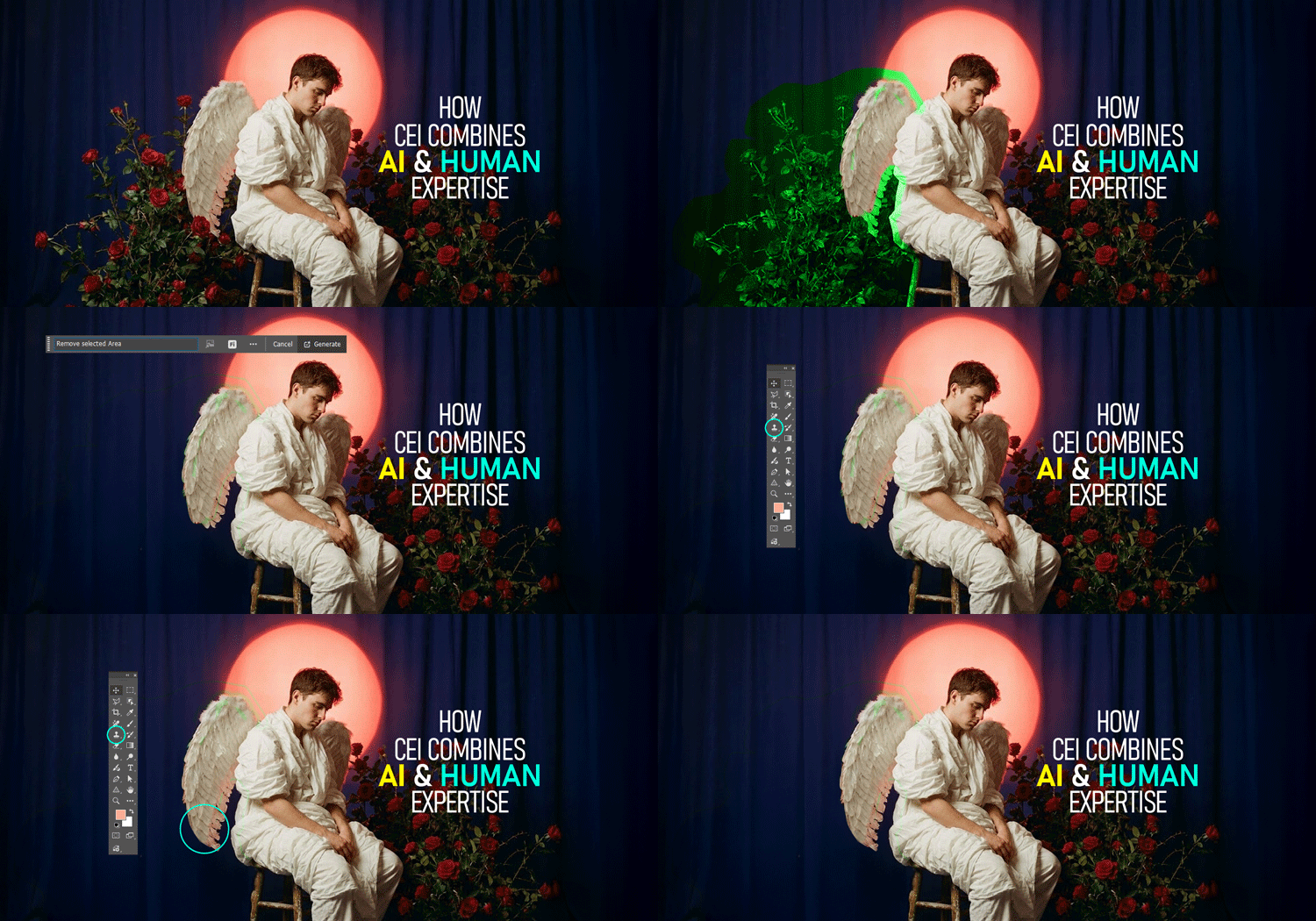
By means of Adobe’s Firefly-powered functionalities such as Generative Fill, Remove Tool, and Object Selection, Photoshop goes down to the pixel level to analyze an image and it also takes into account the lighting, shadows, depth, and perspective.
Just make a rough selection of the area that you want to remove, write what you want to add, or if you want a clean removal just leave it blank. The AI does the filling in a natural way, mixing the new pixels with the old ones so the edit is not distinguishable.
Even if there are tiny details, soft edges, or a complicated background, the tool is there and it is doing everything automatically, thus allowing any user, beginner or a professional, to manipulate objects or people in a short time.
-
Change backgrounds and scenes.
Photoshop with Nano Banana is a crazy-fast and crazy-precise way of changing backgrounds and scenes by employing micro-level AI understanding. It can detect objects, edges, and lighting instantly. Photoshopers needs no more manual masking or clipping path; you just select the subject even if it has hair strands or difficult edges and Photoshop’s Nano Banana AI isolates it at perfect accuracy. After that, you employ Generative Fill or Replace Background to insert the subject into a different scene, and the AI makes the shadow, color, and light adjustments automatically so that everything blends in naturally.
Whether you wish to transfer a product to a studio backdrop or insert a person into a completely different environment, Nano Banana AI takes care of the hard work, thus, background changes of an effortless kind.
-
Modify environmental conditions.
The integration of nano banana in Photoshop features make it very simple to change the environmental conditions of any photo with extreme precision AI.
Instead of going through the tedious process of manually masking skies, shadows, reflections, or even minute lighting details, Nano Banana instruments recognize the inherent structure of a scene and permit you to modify elements such as weather, sunlight direction, color temperature, background texture, and atmospheric effects by merely giving a prompt or by a one-click selection.
It is possible to make a day that looks dull appear bright, be able to add soft fog, heat a sunset, take off the things that you do not want or even reshape the tiny background elements without the realism being compromised.
The AI does this lighting-wise, perspective-wise, and texture-wise automatically, thereby giving you the environmental edits of a pro in just a few seconds which is a thing that used to be done by the advanced retouching skills route.
-
Alter appearance and attire.
Photoshop’s AI features make it very simple to change the environmental conditions of any photo with extreme precision AI.
Instead of going through the tedious process of manually masking skies, shadows, reflections, or even minute lighting details, Nano Banana instruments recognize the inherent structure of a scene and permit you to modify elements such as weather, sunlight direction, color temperature, background texture, and atmospheric effects by merely giving a prompt or by a one-click selection.
It is possible to make a day that looks dull appear bright, be able to add soft fog, heat a sunset, take off the things that you do not want or even reshape the tiny background elements without the realism being compromised.
The AI does this lighting-wise, perspective-wise, and texture-wise automatically, thereby giving you the environmental edits of a pro in just a few seconds which is a thing that used to be done by the advanced retouching skills route.
-
Combine multiple images.
Nano Banana–level AI makes combining multiple images easier than ever by automatically taking care of all the tiny, complex details. Instead of spending hours edging masking, lighting matching, or object aligning, you can just drop your images into the canvas and Photoshop’s micro-precision AI will make the blend for you.
Nano Banana technology understands edges, shadows, textures, and perspective at a pixel level, therefore, it can insert the different parts of one photo into another without the normal cutting or manual retouching. No matter if you are composing composites, making product mockups, or designing creative story scenes, Photoshop has AI-powered selections, Generative Fill, and automatic color matching to combine your images as if they were one, thus, giving you the final result with a clean professional look and saving you a few clicks.
-
Generate consistent characters.
“Nano Banana” micro-precision AI makes creating characters that look consistent quite surprising simple. Instead of redrawing or manually changing features, you can simply use Photoshop’s generative tools to fix a character’s face shape, hair, clothing, proportions, and style at a very small, detailed level. Selecting small parts of the character and applying micro-prompts allows Photoshop to keep the character’s identity and at the same time, you can change the pose, angle, expression, outfit, and background.
The AI recognizes the character’s structure underneath, so every new creation is very similar to the first one. This provides a dependable method for creators to come up with characters that look the same in different comics, storyboards, animations, social content, and branding, without the need of having high-level drawing skills.
-
Restore and colorize old photos.
Restoring and colorizing old photos have never been easier with the help of Photoshop and Nano Banana. They use AI to do the small, complicated details that usually take a lot of time. With the micro-precision tools, you can scratch-free remove, tear edges repair, faded features sharpen, and missing parts of the image rebuild with the amazing accuracy.
After the damage is removed, the AI-powered colorization takes into account the skin tones, clothing, lighting, and even the background to produce the most realistic colors that also make sense historically. Rather than spending a great deal of time masking, painting, and cloning, the Nano Banana tools enable you to restore and colorize an old photo in only a few guided steps thereby, making the photos that were once damaged, beautiful and lifelike again.
-
Create product mockups and marketing materials.
Photoshop with Nano Banana allows you to create product mockups as well as marketing materials in a fraction of the time that it used to take by employing AI-powered micro-editing tools which can understand the shapes, lighting, and textures even at a very small and detailed level.
Using Nano Banana accuracy, any product can be put into a photo, AI may be used to create the shadow that looks most natural, the reflection can be adjusted, the edges can be cleaned, small elements can be replaced and the color of the brand can be matched all without you having to do it manually.
If you want to change a label, swap a background, or add some props for a lifestyle shot, you only have to select the area and give a command to the AI—Photoshop does the rest with studio-quality realism. This is essentially turning the entire mockup process which used to be a multi-step manual workflow into a quick, precise, and highly customizable AI-assisted build that ads, social posts, and eCommerce visuals can benefit from.
-
Adjust photographic elements.
Photoshop with Nano Banana changes photographic elements through AI-powered micro-precision, which helps to grasp each pixel of the photo. In consequence, one doesn’t need to manually mask or retouch small details, as Nano Banana figures out edges, lighting, textures, and object boundaries in order to be able to make very few changes in a photo automatically.
It is capable of polishing hair that is sticking out of a head, small threads of a fabric, reflections, shadows, and tiny objects to the smallest degree of accuracy. And if you have the intention of just swapping an item, getting rid of the imperfections, correcting the lighting, or enhancing the textures, Photoshop’s Nano Banana technology is the one that is accomplishing these works swiftly and with a natural look.
In this way, complicated photo editing tasks become faster, cleaner, and creators get a far more intuitive tool.
-
Visualize designs and concepts.
Photoshop’s Nano Banana is loaded with features that make it very simple to understand the design concepts by allowing you to change even the smallest elements of the picture with the AI-level of accuracy. In place of the manual masking, cutting, or redrawing of the details, the Nano Banana tools simply get the shapes, textures, lighting, and edges.
Indeed, the AI is your agent to bring new things, erase the unwanted elements, color the areas or simply test different design variations without your intervention thus, enabling you to have unlimited and fast experimentation. Such micro-accurate editing serves designers to efficiently envision the concepts, create the layouts, and visualize the creative ideas in a matter of seconds, even if they are not proficient in Photoshop.
-
Expand images
Expanding images is made a lot easier with Photoshop’s Nano Banana technology which is basically an ultra-precise AI that can understand edges, textures, and even the missing background. Whenever you use Generative Expand, Photoshop is actually looking at every, even the tiniest, pixel around the cropped area and it recreates in a very intelligent way what should be outside the frame.
This Nano Banana–level kind of accuracy is what allows the AI to do complex things like hairs, shadows, fabrics, reflections, or backgrounds to rebuild these with much cleaner results than the older tools could give. All you have to do is to extend the canvas, hit the Generate button and Photoshop will do the job of filling the empty space with realistic, naturally blended content—even if the area is extremely small or is a detailed one.
Why This Matters: The Future of AI Editing
Photoshop Nano Banana represents a shift in how creative work gets done.
Before, you needed, the mentioned staff:
- 5+ years of Photoshop experience
- A graphic tablet
- Manual Photo masking and hand-drawn retouching skills
Now, the Photoshop software handles the technical work. Nano Banana integrated with Photoshop lets designers focus on ideas, prompting to edit images, and boosting creativity.
AI is not replacing graphic designer or photo editors. It is removing the boring parts of Photoshop. It allows designers can work smarter.
Who Can Benefit the Most?
- Photographers- Fast retouching. Cleaner edits. More consistent output.
- E-commerce Brands- Perfect product shots lead to higher conversions.
- Graphic Designers- Skip manual selections and work faster.
- Content Creators- Make professional visuals with minimal effort.
- Agencies- Deliver more work within short time without scaling the team.
Final Thoughts
The name Nano Banana might be funny, but the impact on creative industry is enormous. Photoshop Nano Banana AI tool gives you:
- Faster workflows
- Cleaner retouching
- More accurate edits
- Professional results with less effort
- Creativity without limitations
If you are a creator who deals with tiny details or fast production deadlines, this technology is one of the biggest efficiency boosts Photoshop has ever released.